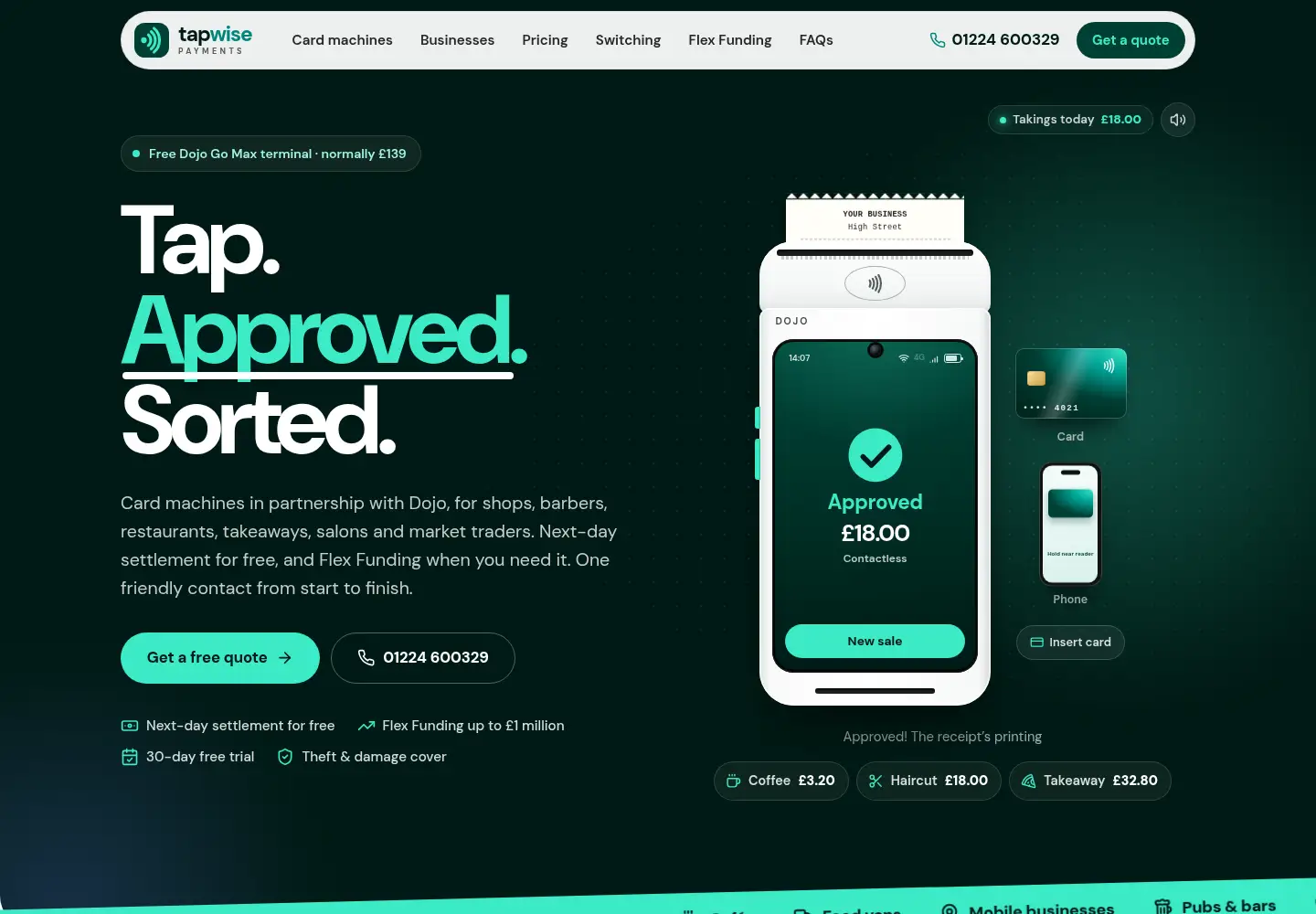
Show, don’t list
The customer problem: every card machine looks the same on paper
Shop owners, barbers and takeaway owners choosing a card machine want answers to three questions quickly: will it work at my counter, what will it cost each month, and who do I call if something goes wrong. Card machine offers are often explained as long lists of features and fees, which makes one provider hard to tell from the next.
Tapwise also works with partners: the card machines come from Dojo and myPOS, and the funding comes from Dojo’s partner YouLend. The website had to make that clear without burying the offer in small print.
The delivered structure
A card machine you can try
The opening screen has a working Dojo terminal on screen. Visitors key in an amount, or pick Coffee, Haircut or Takeaway, and watch the payment go through to “Approved”.
A day at the counter
A scrolling story follows six businesses through one day, from a corner shop at 07:45 to a takeaway at 21:10, showing contactless, phone payments, chip and PIN and the switch to 4G when the Wi-Fi drops.
Monthly costs in plain numbers
The pricing section shows the terminal offer (normally £139, free on the special offer), the £5.99 hardware charge and the £11.99 software charge, £17.98 a month together, and says card fees are quoted separately.
A short quote form and a phone number close by
The quote form asks for the type of business, the current provider and the best time to call. The phone number sits in the header, on the opening screen and in the footer.
The buying journey, question by question
This table follows the buying journey: the questions a business owner arrives with and where the finished website answers each one.
| The customer’s question | Where the website answers it |
|---|---|
| Will it work for my kind of business? | The business types on the opening screen and the day-at-the-counter story. |
| What will it cost each month? | The pricing section and the first question in the FAQ: £17.98 a month for hardware and software, with card fees quoted separately. |
| Can I leave my current contract? | A switching section explains that Dojo may be able to buy out an existing contract, subject to eligibility and the offer’s terms. |
| How does Flex Funding work? | An explainer with a chart showing repayments as a share of daily card takings, and the eligibility conditions next to it. |
| Who am I dealing with? | The FAQ and the footer say Tapwise Payments is an independent business working in partnership with Dojo, and not part of Dojo or myPOS. |
See the result
Try the live website for yourself.
Open Tapwise Payments to try the card machine demo, the pricing section and the quote form.
What can be verified on the live website
- Public HTTPS website
- Mobile-friendly layout
- Working card machine demo
- Monthly costs in plain numbers
- Quote form with a best time to call
- Partner terms stated on the page
- Search and sharing metadata
- “Website by Millwards Digital” in the footer
Open tapwise.co.uk to see the current live version. The dated homepage capture above and the evidence list record what was reviewed on 14 November 2026; offers and prices on the live website may change.
What other businesses can take from this build
If customers find your product hard to picture, letting them try it on screen does more than another paragraph of description. Then answer the money question in plain numbers, say clearly who provides what, and keep the way to get in touch short and close at hand.
The same approach suits any business selling something people compare closely, from software and equipment hire to insurance and finance brokers. The small-business web design guide explains how we plan pages and structure, and the UK website costs guide shows what different site sizes cost over the first year. Interactive features like Tapwise’s demos are custom work and aren’t part of our fixed Launch package, so ask us for a quote if you want something similar.